XANADU Infrastructure
Network Architecture & Security Lab
Results
- Full network architecture designed for a 60-user company, implemented on Proxmox lab
- Default-deny firewall policy with VLAN segmentation to limit blast radius
- 3-2-1 backup policy with 4-hour RTO target for critical services
This is an academic project built around a fictional company, XANADU, a 60-user organization relocating its headquarters to the Atlantis technology park and opening a remote laboratory site at Springfield. The full architecture was designed on paper, then implemented at reduced scale on a Proxmox hypervisor: pfSense as gateway and firewall, Windows Server VMs for Active Directory and file services, a Debian VM hosting the ERP stack in Docker, and a Zabbix VM for monitoring. The goal was to demonstrate every core principle of the target architecture (delegated administration, network segmentation, backup isolation, remote access) in a running lab environment.
Network segmentation
The first question was: how do you limit blast radius? The answer was strict VLAN segmentation enforced at the firewall level.
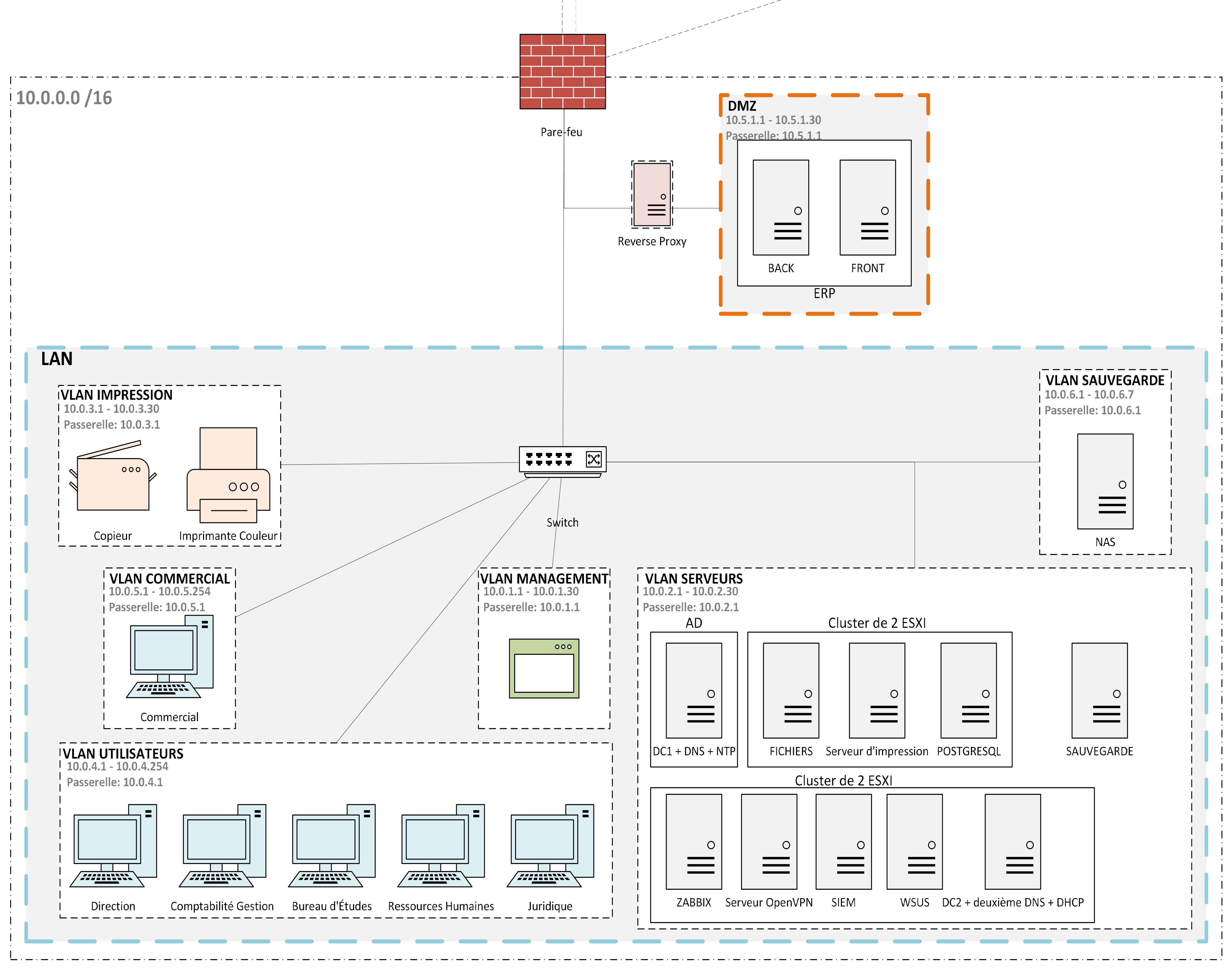
The Atlantis site is split into six VLANs: Users, Sales, Servers, Management, Printers, and Backup. Each VLAN has its own subnet and all inter-VLAN routing goes through pfSense, which applies explicit allow rules. Everything else is denied by default.
Sales reps are isolated because they regularly connect to unknown Wi-Fi networks. If their machine is compromised, the attacker stays contained in the Sales VLAN and cannot reach the Servers VLAN. Printers get their own segment because they run unpatched firmware and have no antivirus. They are a classic pivot point and should not have lateral access to anything. The Backup VLAN is the most restricted: only the backup server can write to the NAS, and no user workstation can reach it at all. This is the key ransomware defense: the backup copy is network-isolated from the production environment.
A DMZ holds the public-facing ERP components (frontend and backend). The database (PostgreSQL) stays in the Servers VLAN. The only allowed path between the DMZ and the Servers VLAN is a single firewall rule scoped to the database port. A full ERP compromise leaves the data tier untouched.
Inter-site link and remote site
The Atlantis and Springfield sites are connected via an MPLS L3VPN link. Unlike a best-effort VPN over the public internet, MPLS comes with guaranteed bandwidth and a contractual latency SLA (< 50ms). This matters because Springfield users access the ERP hosted at Atlantis over this link, and unpredictable latency would make the application unusable.
Springfield mirrors the Atlantis segmentation model: Users, Servers, Management, Printers, and Backup VLANs, each on a separate addressing plan (10.1.0.0/16 vs 10.0.0.0/16). This consistency reduces administrative overhead and makes firewall rules predictable across both sites.
Active Directory and fault tolerance
Authentication availability is non-negotiable. If the domain controller goes down, nobody can log in and work stops. The mitigation is two domain controllers at Atlantis (DC1-ATL and DC2-ATL), both configured as Global Catalog servers and replicating in real time. If one fails, the other takes over transparently with no user intervention needed. All FSMO roles are consolidated on DC1-ATL to simplify management.
Springfield runs a Read-Only Domain Controller (RODC). Two reasons: security and availability. On the security side, a RODC does not store privileged account credentials. Even if the physical server is stolen, the attacker cannot extract domain admin hashes. On the availability side, Springfield users can authenticate locally without crossing the MPLS link. If the inter-site link drops, the lab keeps working.
Delegated administration
Rather than giving every department IT contact full admin rights, we used Active Directory delegation to give each service contact write access only to their own Organizational Unit. A HR referent can create and reset accounts in the HR OU; they cannot touch the Servers OU, the backup configuration, or any other service’s data. Technically this is implemented via ACL delegation on each OU scoped to a dedicated security group (e.g. Gestionnaires_RH).
Group Policy Objects enforce consistent security baselines without manual intervention: 12-character minimum passwords with 90-day rotation, automatic session lock after 10 minutes of inactivity, USB storage blocked, Windows Defender centrally configured and non-disableable by users, and software installation restricted to signed packages from approved paths. All these policies target OUs, not the domain root, so we can apply exceptions to specific groups without affecting the whole environment.
Backup architecture: 3-2-1
The director’s core fear was ransomware encrypting everything. The defense is a backup architecture where the attacker cannot reach all copies simultaneously.
We applied the 3-2-1 rule strictly:
- Copy 1: production data on servers
- Copy 2: local NAS at Atlantis, isolated in its own VLAN, reachable only by the backup server
- Copy 3: replicated to a NAS at Springfield via the MPLS link (off-hours to stay within bandwidth budget), and separately to encrypted cloud storage
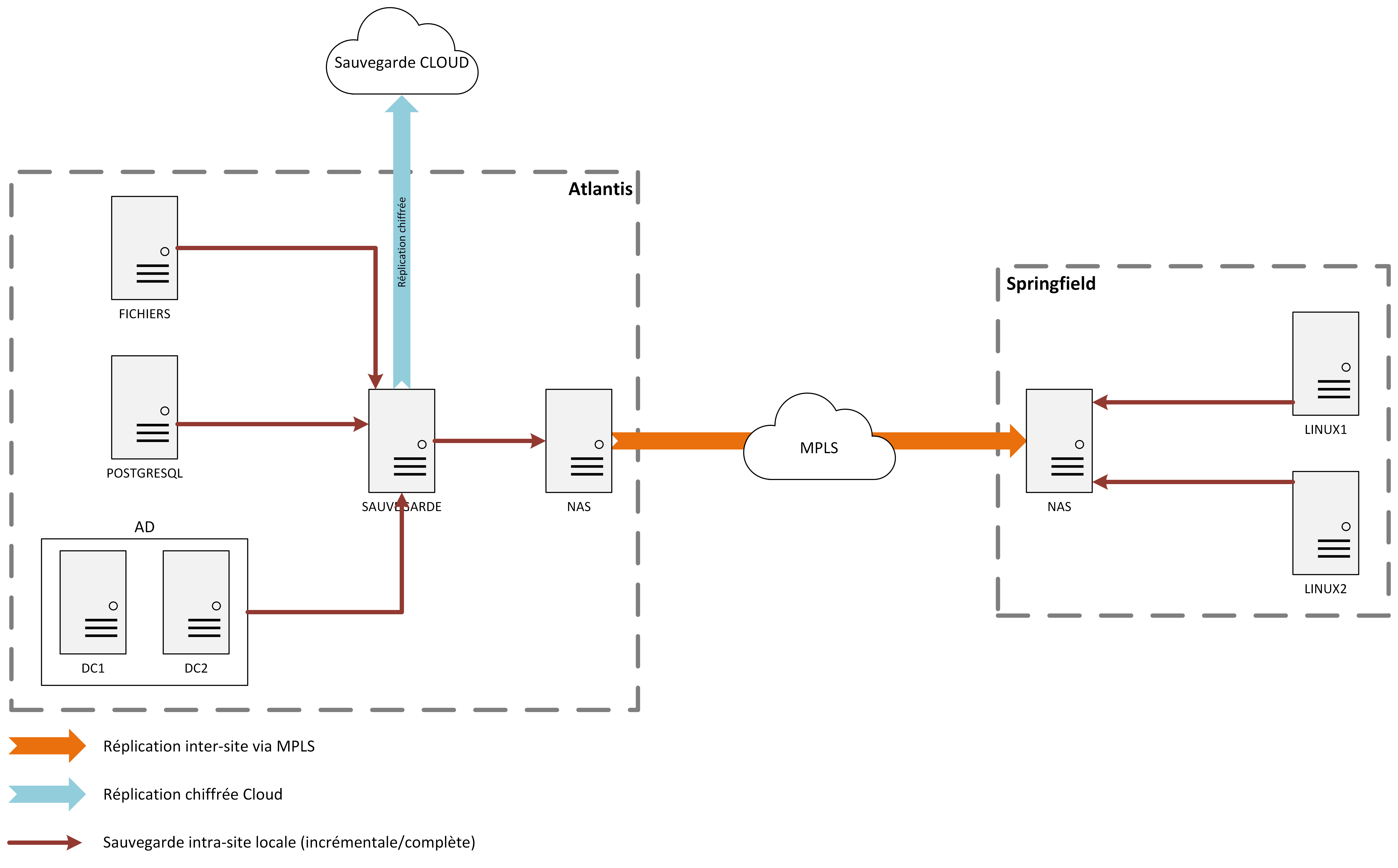
Even if ransomware compromises the entire Atlantis network, it cannot encrypt the Springfield NAS (different physical site, different network) or the cloud copy (airgapped once uploaded).
Data is classified by criticality with different RPO/RTO targets:
| Tier | Data | RPO | RTO |
|---|---|---|---|
| Critical | ERP database (PostgreSQL) | 1 hour | 4 hours |
| Critical | Legal & Management file shares | 4 hours | 4 hours |
| Important | Other file shares, Office 365 | 24 hours | 24 hours |
| Standard | Personal folders | 48 hours | 24–48 hours |
For the ERP database, hourly incremental backups run throughout the day, with a full backup nightly. The VM images for the application and presentation tiers get daily incrementals and a weekly full. This allows Veeam’s Instant Recovery to restore a running VM in under an hour directly from the NAS, without needing to copy the entire image first.
Active Directory gets a daily full backup (system state + VM image). Restoring a domain controller is the critical path for everything else, so a clean and recent snapshot must always be available.
User workstations are intentionally not backed up individually. GPOs redirect “My Documents” and Desktop to the file server. The data lives centrally and gets covered by the file server backup plan. A laptop dying is a hardware replacement, not a data recovery event.
NAS sizing
Production data volume: ~800 GB shared drives + ~300 GB personal folders (5 GB × 60 users) + ~20 GB ERP = ~1.1–1.5 TB. With incrementals, weekly fulls, and 90-day retention, the NAS needs to absorb roughly 3–5× production volume. We sized for ≥ 8 TB configured in RAID 6 (dual-parity), which tolerates two simultaneous disk failures without data loss.
Monitoring and observability
Zabbix monitors all hosts, with alerts routed to the admin team. The integration with the backup server means a failed backup job pages someone immediately; a silent backup failure is the worst kind, discovered only when a restore is actually needed. A SIEM aggregates logs from pfSense, Active Directory, and file servers for incident reconstruction and audit trails.
Why we built it this way
pfSense over a managed switch-only approach. pfSense combines routing, firewall, DHCP, OpenVPN, proxy (Squid), and IDS (Suricata) in one open-source appliance. For an SME, consolidating these services reduces management surface without sacrificing control. Dedicated appliances per function would have been operationally heavier and significantly more expensive.
RODC at Springfield, not a full DC. A full writable DC at a physically less-secure remote site is a risk: anyone with physical access and a bootable USB can extract the Active Directory database. A RODC gives local authentication and DNS resolution without exposing writeable credentials. Administration changes still route through Atlantis via the MPLS link, keeping authority centralized.
Backup VLAN, not just VLAN-tagged NAS ports. The NAS shares network access with the Servers VLAN in many default configurations. We deliberately put the backup infrastructure in a separate VLAN with firewall rules allowing only the backup server to initiate connections. This means a ransomware infection spreading through the Servers VLAN cannot reach the backup destination directly.
RAID 6 over RAID 5. RAID 5 tolerates one disk failure. During the rebuild after a first failure, a second disk failure destroys all data. Rebuild times on large disks now run 12–24 hours, during which the array is at risk. RAID 6 tolerates two simultaneous failures, eliminating that window entirely.
GFS rotation, not flat retention. Keeping every daily backup for 90 days would exhaust capacity quickly. GFS keeps daily backups for 7 days, weekly backups for 3 months, and monthly backups for a year. This provides short-term fine-grained recovery (deleted file from yesterday) and long-term coarse recovery (compliance, legal holds) without proportional storage growth.
Firewall filtering policy
The base rule on every interface is deny-all. Every allowed flow is an explicit exception with a documented justification. This forces the question “does this flow actually need to exist?” at design time rather than opening broad rules and hoping nothing leaks.
Users VLAN: workstations can reach the two internal DNS servers (port 53), the file server (SMB/445), the ERP web interface (HTTPS/443, front-end only), the print server (9100), the domain controllers (Kerberos, LDAP, RPC, NTP, the full AD port set), and any public IP outside RFC1918 for internet access. They cannot initiate connections to the Management VLAN, the Backup VLAN, or internal server IPs other than those explicitly listed.
MPLS interface: Springfield traffic is allowed to reach the Atlantis domain controllers for authentication, the ERP for the lab and remote offices, and the file server. Nothing else crosses the inter-site link.
OpenVPN interface: remote workers get the same scoped access as on-site users: AD authentication, ERP, and the file server. No broader access to the Servers VLAN.
Servers VLAN: servers can query Google DNS (8.8.8.8:53) for external resolution forwarding, reach NTP, pull Windows Updates and antivirus signatures (HTTP/HTTPS to non-RFC1918 addresses), and write backups to the NAS over SMB. Inbound connections from workstations only reach services that have an explicit rule on the Users VLAN side.
Management VLAN: the only interface from which admins can reach Zabbix (443/22), the ERP server (SSH/22), and the pfSense management interface (443/22). No workstation outside this VLAN can initiate connections to management ports.
WAN interface: a single inbound rule: UDP/1194 for OpenVPN tunnel establishment. Everything else is dropped at the perimeter.
Administration scripts
Manual Active Directory operations are a reliability risk: a typo when creating an account puts the user in the wrong OU, which means the wrong GPOs apply from day one. We automated the ten most common admin tasks with PowerShell scripts.
User lifecycle. Account creation places the user in the correct service OU automatically (OU=RH,DC=xanadu,DC=com for HR, etc.) so Group Policy applies immediately without manual intervention. Departure triggers disable + move to OU=Desactive, preserving the account for legal audit trails without leaving it active. Password reset forces a change on next login so the admin never knows the final password.
Hygiene and compliance. An inactive-account report flags any user who has not authenticated in 45 days, catching forgotten stager accounts and unreported long-term absences before they become an attack surface. A disk-space probe queries critical servers and alerts before saturation causes a service outage (a full disk on the ERP database server is an instant P1 incident).
Backup script. The backup script compresses the target data into a timestamped archive, records the archive size, and transfers it via SCP to the remote repository. It runs in an isolated temp directory to prevent partial writes from being mistaken for complete archives. Bandwidth is throttled on the MPLS link to avoid displacing application traffic during business hours.
Visibility scripts. Group inventory dumps all members of a target AD group with last-login timestamps, used during quarterly access reviews to spot stale memberships. Workstation inventory resolves each machine’s online/offline state and active session user, giving the helpdesk immediate context during incident triage. Large-file identification scans a path and outputs a ranked list of files exceeding a threshold, helping administrators find backup-bloating files (video exports, VM snapshots left in production shares) before they expand the backup window.
Locked-account management. The script lists currently locked accounts and unlocks a target account after confirming eligibility, with the action logged to the AD audit trail. Repeated lockouts on the same account generate a separate alert, as this pattern often indicates either a credential-stuffing attack or a service account with a hardcoded stale password.
Security monitoring
Zabbix handles infrastructure health (server uptime, interface states, CPU/disk/memory thresholds, MPLS link availability). Wazuh aggregates security logs from Windows DCs, Linux servers, pfSense, and network equipment, correlating events across sources to surface patterns invisible in any single log stream. Backup job status is fed into Zabbix so a silent failure pages the on-call admin immediately.
Ten trigger categories are defined, each with a criticality level, source, and response procedure:
| Event | Criticality | Response |
|---|---|---|
| Repeated auth failures on a user account | High | Immediate alert + account watch |
| Successful login outside business hours | Medium–High | Alert + manual verification |
| Admin group membership change | Critical | Immediate alert + author verification |
| AD DS service stops abnormally | Critical | Emergency response |
| Inbound connection blocked by firewall (repeated) | High | Log + alert escalation |
| Backup job failure on critical server | Critical | Immediate alert + manual re-run |
| Disk space below critical threshold | High | Auto-alert + cleanup or expansion |
| Malware detected on endpoint | Critical | Isolate machine + full scan |
| VPN inter-site link down | High | Emergency restoration |
| Mass file deletion event | Critical | Suspend account + restore from backup |
The mass-deletion trigger is the ransomware canary. A ransomware encrypting the file server generates a spike in file modification and deletion events that Wazuh detects within seconds, long before the encryption completes. The response is account suspension and rollback from the last snapshot, bounding data loss to the snapshot interval rather than the entire dataset.