EasySave
Open Source File Backup Software
Results
- Cross-platform backup tool running on Windows, Linux, and macOS
- AES-256 file encryption with RSA-authenticated subprocess to prevent unauthorized access
- Binaries published automatically via GitHub Actions for each release
EasySave is a backup job manager built in C# that supports full and differential strategies, runs jobs in parallel, encrypts files on the fly, and ships logs to a remote TCP server. It ships two frontends: a cross-platform desktop GUI built with Avalonia and a keyboard-navigable console TUI, both sharing the same core engine without duplication.
Architecture
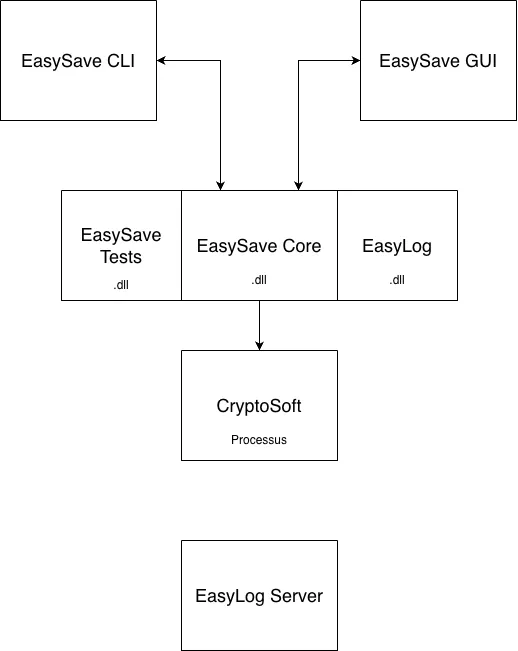
The solution is split into six decoupled projects: EasySave.Core (shared business logic), EasySave.GUI, EasySave.CLI, EasyLog (pluggable logger), EasyLog.Server (TCP log aggregation, Docker), and CryptoSoft (standalone encryption tool).
Both frontends are built on MVVM. User interactions go through ICommand implementations ([RelayCommand]), which execute async operations without blocking the UI thread. Swapping or adding a frontend only requires wiring a new view; the core and ViewModels stay untouched.
Avalonia was chosen over WPF specifically for its cross-platform support: it uses the Skia 2D rendering engine instead of DirectX, which means the same C# codebase runs on Windows, Linux, and macOS with no platform-specific branches.
Design patterns used throughout: Strategy for backup types and log formats, Observer for real-time job state propagation, Singleton for shared services.
Parallel execution and priority scheduling
Each backup job runs in a dedicated Task via Task.Run, with async/await for all I/O operations. CancellationToken instances back the Play/Pause/Stop controls; every component checks its token regularly and stops cleanly when cancelled.
Shared state is protected with a ReaderWriterLockSlim (many concurrent reads, few writes), while lock is reserved for tighter local critical sections like internal counters. SemaphoreSlim instances model limited resources, specifically the max number of large-file transfers allowed to run simultaneously.
Priority scheduling works at the extension level: users declare which file types are critical (e.g. .docx, .pdf). Before any job starts, SeparatePriorityFiles in FileUtils.cs splits the file set into two groups. TransferLimitService then coordinates across running jobs: WaitForPriorityFile blocks a non-priority transfer if a priority file is still pending, and AddPendingPriorityFile registers its presence in the coordination layer. This guarantees that within the first minutes of any job, the critical files are already secured.
The business software monitor runs as a background check: when a configured process is detected, all active jobs pause automatically and resume when it exits.
File encryption
Files are encrypted during backup by calling CryptoSoft as a subprocess. The call is security-hardened: EasySave signs a UTC Unix timestamp with a 4096-bit RSA private key and passes the timestamp and signature to CryptoSoft via environment variables. CryptoSoft verifies the signature and rejects any call older than 2 seconds, blocking replay attacks. The private key is stored in %AppData%\ProSoft\EasySave\keys\ with OS-level ACL restrictions.
CryptoSoft enforces single-instance per machine via a named Mutex (scoped to machine and user), queuing concurrent encryption requests automatically. EasySave also holds a software-level lock before each invocation, two barriers combined to eliminate race conditions in concurrent backup sessions.
Two encryption algorithms are available: XOR for lightweight obfuscation, and AES-256 for strong encryption. For AES, the user-provided passphrase is passed through SHA-256 to derive a 32-byte key, guaranteeing correct key length regardless of input. Encrypted files are suffixed with .lock.
Logging
LogEntry objects are produced for every significant event (file transfer, encryption, error) and routed to one of two destinations based on configuration. In local mode, entries are serialized to date-based JSON or XML files. In remote mode, they are sent over a TCP socket to EasyLog.Server, a Docker service that deserializes and writes them to the same date-based format on a mounted volume. A hybrid mode (local and remote) is also supported. The log library is a separate DLL, decoupled from both frontends and EasySave.Core.
CI/CD
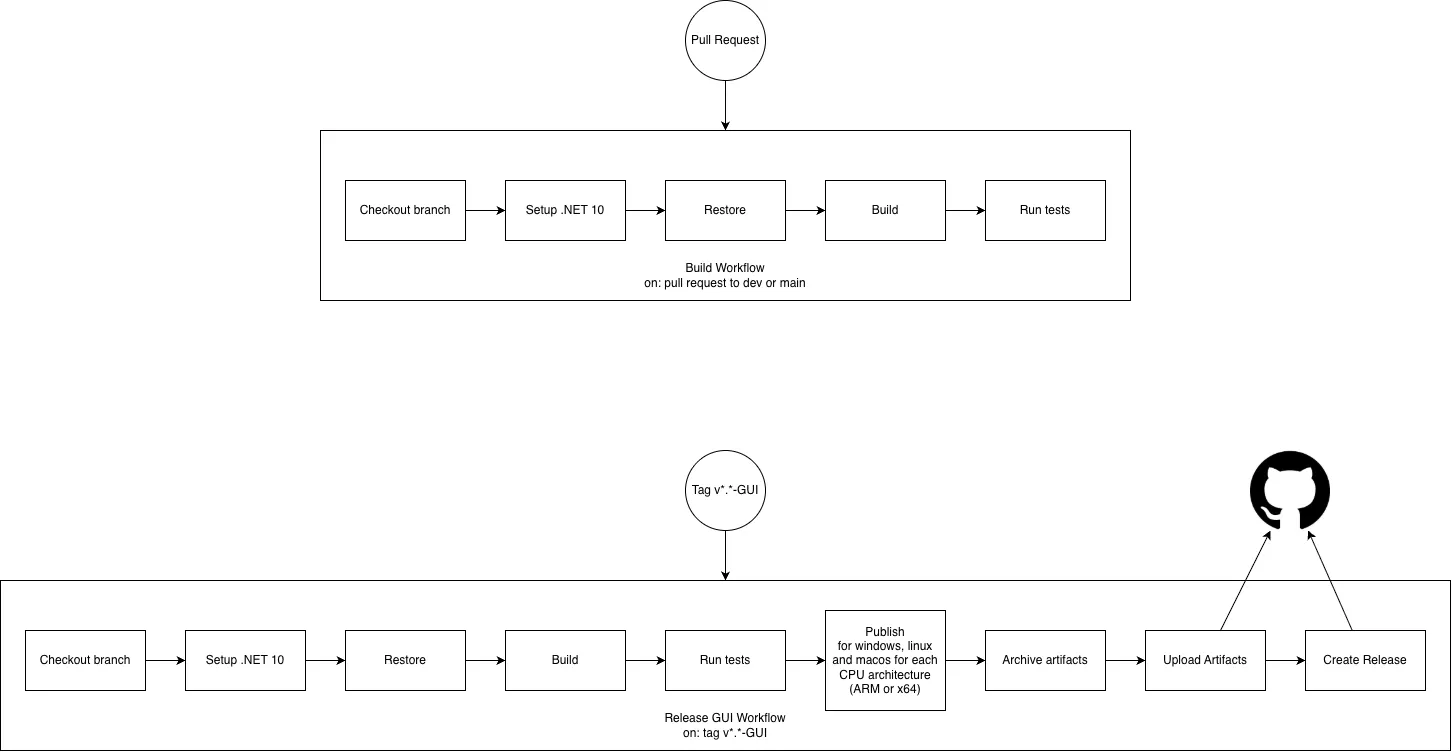
Two workflows run on GitHub Actions. The first triggers on every pull request: checkout, .NET 10 setup, restore, build, and full test suite. A PR cannot merge until all steps pass.
The second triggers on version tags matching v*.* - GUI. It runs the same validation steps, then publishes multi-platform binaries (Windows, Linux, macOS, x64 and ARM), archives the artifacts, uploads them to GitHub, and creates a release automatically. Each tag maps to a reproducible, tested set of binaries.
Why we built it this way
Avalonia over WPF. WPF ties you to DirectX and therefore to Windows. Since cross-platform support was a requirement from day one, Avalonia’s Skia-based renderer was the obvious call. One codebase, three platforms, no branches.
Six projects instead of one. The split was deliberate: CryptoSoft and EasyLog can evolve independently or be reused in other tools without pulling in the entire backup engine. It also means clients on older EasySave versions can keep using the same log DLL interface even as the implementation changes underneath.
RSA authentication for CryptoSoft. CryptoSoft is a CLI tool, which means any process on the machine can call it. Without authentication, a malicious application could use it to encrypt arbitrary files. The RSA + 2-second timestamp window adds a hard authorization boundary without changing anything for legitimate callers.
Two barriers for single-instance enforcement. The OS-level Mutex alone has a small race window between when EasySave checks if CryptoSoft is running and when it actually launches the process. The software-level lock on EasySave’s side closes that window entirely.
ReaderWriterLockSlim for global state. The backup state is read constantly (UI refresh, status polling) but written rarely (job start/stop transitions). A plain lock would serialize all reads unnecessarily. ReaderWriterLockSlim matches the actual access profile.
Extension-based priority, not file-by-file. Asking users to flag individual files would be unusable in practice. Extensions are the right level of abstraction: simple to configure, meaningful to non-technical users, and precise enough for the scheduling logic to act on.